
Spreadsheets Enable Calculations Similar to CAM Software
Spreadsheet software can behave like a CAM system.
.jpg;width=70;height=70;mode=crop;format=webp)
Share


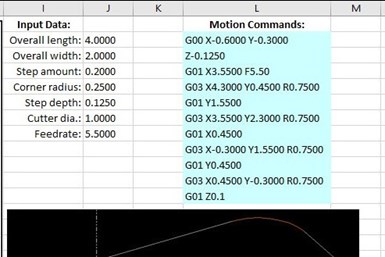
Spreadsheet can be used like CAM software.
You probably use spreadsheets every day. They are great for a multitude of applications—everything from creating grocery lists to organizing your company’s production information. If you program CNCs, you probably use a computer-aided manufacturing (CAM) system. But did you know that you can get a spreadsheet to behave like a uniquely customizable CAM system?
Obvious spreadsheet features, such as entering data into cells or displaying calculated results in others, along with the ability to format results as strings of data, enable the creation of G-code commands that consider and manipulate current values in input-data fields.


Running through an example can illustrate how a spreadsheet can function like CAM software. Consider this: spreadsheet cell J7 contains the diameter of a milling cutter that will machine a contour. Other cells contain input data about the contour, but let’s keep it simple for now. The X-axis-approach position for this milling cutter will be to the left (X negative side) of the program origin by the cutter radius plus a 0.1-inch-approach distance. For a 1.0-inch cutter, the required G-code command will be:
G00 X-0.6
Here is a Microsoft Excel spreadsheet formula that will generate the required command:
=“G00 X-” & FIXED(J7/2+0.1,4)
The equal sign begins a formula. Quotations surround a text string. The ampersand specifies information that will be added to the text/data. The “fixed” function enables the specification of decimal point values. Note the “4” after the comma specifies that the calculated value will be displayed to four places.
Looking at the calculation within the parentheses, the current value of cell J7 is 1.0. When 1.0 is divided by two (0.5) and then added to a value of 0.1 (the clearance amount), the result is 0.6. The result of this formula (with cell J7 currently set to 1.0) is:
G00 X-0.6000
This should seem familiar if you have experience with custom macro. Indeed, just about anything you can do with a custom macro program can be done with spreadsheet software.
One advantage of using a spreadsheet instead of a custom-macro program is that the control will not have to perform calculations or make decisions during the program’s execution. Another benefit is that the CNC machine tool need not be equipped with custom macro or any version of parametric programming.
The illustration below shows a more elaborate example to demonstrate what is possible.
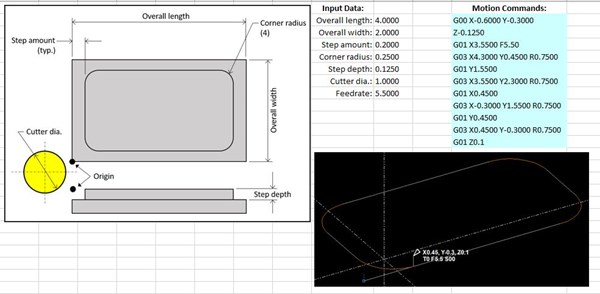
The drawing shows the contour to be milled, along with the variable names for input data. The list of input data is to the right, and to the right of that are the resulting G-code motion commands. The created tool path, which is not interactive, is shown as well.
As you change an input-data value, the related motion commands immediately change. Once all input data are appropriately set, you can copy the motion commands from the spreadsheet and paste them into your CNC program.
You can download the spreadsheet to see the formula for each motion command, but here is one of them. It is for the first G03 circular-motion command:
="G03 X" & FIXED(J2-J4+J7/2,4) & " Y" & FIXED(J4+J5,4) & " R" & FIXED(J5+J7/2,4)
This renders (for the current input data settings):
G03 X4.300 Y0.4500 R0.7500
Again, each ampersand will add to previous data. And as with a custom-macro program, each CNC word will be the result of a calculation that involves input data. The X-word begins with the overall length (4.0), subtracts the step amount (0.2) and then adds the cutter radius (0.5). With the “fixed” function specifying four decimal places, the result is X4.300. Similar techniques are used for other CNC words in this formula as well as for other CNC words in the other formulae.


Related Content

Cutting Part Programming Times Through AI
CAM Assist cuts repetition from part programming — early users say it cuts tribal knowledge and could be a useful tool for training new programmers.
Read More
How a Family-Owned Tooling Company Competes with Global Giants (Includes Video)
Not ready to go digital? Consider this: With Siemens NX ecosystem, precision shop D’Andrea cut its programming time by 50% and is able to compete globally—even against industry giants.
Read More
Advanced Tool Paths, Simple Implementation
Programming advanced tool paths used to be a complex, time-consuming task. Canned cycles in CAM software have now made them more accessible than ever.
Read More
Refining the Handoff Between the CAM Program and the Real-World Process
Despite the best intentions in the virtual world, the manufacturing process is limited to what survives the handoff from screen to spindle.
Read More